Vocabulary
- Quality attribute — a measurable or testable property of a system used to indicate how well the system satisfies the needs of its stakeholders.
- Non-functional requirement (NFR) — defines the criteria used to evaluate the whole system rather than a specific behaviour; also called quality attributes and described in detail in architectural specifications.
- ASR (Architecturally Significant Requirement) — includes the most important requirements for architecture, whether functional or non-functional. An ASR directly impacts architecture design, whereas an NFR may or may not. That is why an ASR has more relevance than an NFR when referring to architecture requirements.
Only a subset of functional requirements, QA requirements and constraints are architecturally significant — the three sets intersect. In practice QA requirements and constraints are almost always ASRs; functional requirements more rarely. A typical functional ASR concerns integration: "integrate with a very old version of SAP."
Solid arrows mark the sets that are almost always architecturally significant; the dotted arrow marks the one that only sometimes is.
"Significant" is ultimately measured by high cost of change — monetary or not (time, resources, reputation, opportunity cost). What counts as high is invariably project-specific: a $10,000 cost can be high for a small-budget project and low for a large one. Some cost measures can be entirely qualitative yet still identifiable in their ability to distinguish ASRs.
A trade-off point is one at which no solution satisfies all involved requirements equally well, so the architect must select a design option that compromises some requirements to meet others.
The ASR characterisation framework
From Characterizing Architecturally Significant Requirements (Chen, Ali Babar, Nuseibeh — IEEE Software, March/April 2013). An empirical grounded-theory study of 90 practitioners across four countries (58% US, 28% India, 13% Netherlands, 1% UK), who had collectively worked for 500+ distinct organisations, with more than 1,448 years of accumulated software development experience and 761 years in software architecture. 52% were architects, 20% executives, 14% managers, 8% consultants, 6% developers. Only concepts mentioned by at least two participants made the final findings.
The motivation matters: if ASRs are wrong, incomplete, inaccurate or lack detail, then an architecture based on them is also likely to contain errors. In practice stakeholders and requirements engineers frequently fail to express or effectively communicate ASRs to architects, preventing informed design decisions. This work sits within the twin peaks model, where problem and solution development interplay iteratively.
The framework has four sets of characteristics.
1. Definition
ASRs are those requirements that have a measurable impact on a software system's architecture. This delimits the portion of requirements that affects architecture in measurably identifiable ways. Empirically the distinction is real — participants did not perceive "temperature should be displayed in Celsius not Fahrenheit on this webpage" as architecturally significant, but did usually perceive "the system should provide five nines (99.999%) availability" as such.
"Significant" is measured by high cost of change — monetary or not. What counts as high is invariably project-specific.
2. Descriptions — how ASRs behave in the wild
| Description | What it means in practice |
|---|---|
| Hard to define and articulate | "Users usually find it difficult to articulate [ASRs], as many of them are about abstract and general concepts." And ASRs are expected to be ready early in the process, which adds to the difficulty |
| Tend to be described vaguely | Architects report receiving ASRs too vague to make informed decisions. Vague ASRs lead to bad decisions because architects make wrong assumptions about the missing details. The worked example: users requested the ability to receive notification about cash flows. Architects assumed email would be acceptable. During detailed design users explained they wanted real-time notification, the ability to subscribe to different account topics, and a UI showing all of this — which required publish-subscribe, a different architecture style entirely |
| Tend to be neglected initially | "Typically [ASRs] are overlooked in the early phase of a project" — from lack of initial awareness of their significant effects. "Users do not typically have a good understanding of [ASRs]; people who conduct requirement analysis often do not document them properly. … Users will not ask for them unless you are dealing with a highly tech-savvy group." Happens more with less-experienced teams. Many times requirements aren't recognised as architecturally significant until they've incurred a high cost — and at that stage rectifying mistakes can be costly |
| Tend to be hidden within other requirements | Following the way people spontaneously express requirements, ASRs usually aren't emphasised; they're embedded in other requirements' descriptions. Short phrases like "highly available system of 99.999 percent uptime" or "fault tolerant" are often mentioned only briefly while describing something else — but these phrases can significantly affect architecture. When architects receive ASRs hidden this way, they usually aren't sufficiently elaborated and lack the key details needed |
| Subjective | ASRs tend to be requested based on opinion rather than fact-based objective decisions. "[ASRs requested by customers] usually contain subjectivity — for example, 'The system should be available for 24/7' — whether it [needs to] be or not." Small differences in ASRs can lead to big differences in resulting architectures |
| Variable | ASRs change over time, usually unavoidably, owing to business and technology change. "Technology … is now changing so quickly that companies are viewing products as having a very limited (and short) lifetime before needing to be redesigned." ASRs also vary over space — consider similar systems engineered as a software product line |
| Situational | "A requirement is architecturally significant in one case, while being 'just a requirement' in the other case." Situational with respect to an existing architecture, a project's context or scope. A requirement might be significant where a "bad" architecture is in place but not where the architecture is "good". "A simple requirement in a smaller project might not be architecturally significant. Take the same requirement and enhance scope, add multiple interactions — then it could become significant" |
The consequence the authors draw: a definitive judgement usually can only be made when the requirement really incurs a high cost, or when the architect requires it to make architectural decisions. During requirements gathering we can only say certain requirements are likely to be architecturally significant. "Finding a definitive list of ASRs is not feasible. ASRs need to be dealt with individually."
3. Indicators — pragmatic hints without full cost estimation
Although cost of change is the measure of significance, getting an accurate cost is challenging, and cost estimation usually happens after requirements are gathered. Indicators give pragmatic hints instead.
| Indicator | Why it signals significance |
|---|---|
| Wide impact | When a requirement has wide impact — in terms of components, other requirements, code modules, stakeholders — it's usually architecturally significant. "[An ASR] has widespread impact across multiple components of the system"; "The more broadly a requirement and its resolution can be applied, the more significant it is" |
| Targeting trade-offs | A trade-off point is one where no solution satisfies all involved requirements equally well, so the architect must compromise some to meet others. Such requirements directly affect the outcome of architecture decisions. "The trade-offs are the weak points — the raw nerves — of the architecture. If a new requirement happens to (unintentionally) target these trade-offs … then the probability of it becoming architecturally significant is higher." When a requirement targets a trade-off point, the details, accuracy and precision of its description become critical |
| Strictness (constraining, limiting, non-negotiable) | Requirements satisfiable by multiple design options — or negotiable into such a form — allow flexibility in design. A strict requirement determines architectural decisions because it can't be satisfied by alternatives. "Our significant requirements were those that would be the limiting, or defining, characteristics of the product" |
| Assumption breaking | When designing, the architect makes fundamental assumptions, explicitly or implicitly — for example that turning down the server at midnight for maintenance is acceptable. Later this might no longer hold, and the requirement that breaks the assumption forces a different design |
| Difficult to achieve | Judging whether a requirement is difficult to achieve requires substantial knowledge of the solution space — which requirements engineers usually aren't expected to have. This limitation is precisely why the fourth set exists |
4. Heuristics — categories familiar to requirements engineers
Because indicators like difficult to achieve demand solution-space knowledge that requirements engineers typically lack, the framework offers heuristics: familiar categories where ASRs concentrate.
| Heuristic category | Look here |
|---|---|
| Quality attributes | The largest source. The paper's own list: Configurability, Flexibility, Interoperability, Performance, Recoverability, Scalability, Stability, Security, Portability, Reusability, Testability, Auditability, Sustainability, Supportability, Usability |
| Core features | The central functionality of the system |
| Constraints | Requirements that remove design freedom |
| Application environment | The context the system must operate within |
A closely related SEI source worth reading alongside it: Clements and Bass, Relating Business Goals to Architecturally Significant Requirements for Software Systems, CMU/SEI-2010-TN-018 — the origin of the eleven business-goal categories documented later in this module.
Quality attribute master list
| Operational | Developmental |
|---|---|
| Availability | Modifiability |
| Interoperability | Variability |
| Reliability | Supportability |
| Usability | Testability |
| Performance | Maintainability |
| Deployability | Portability |
| Scalability | Localizability |
| Monitorability | Development distributability |
| Mobility | Buildability |
| Compatibility | |
| Security | |
| Safety |
Definitions worth memorising:
| Attribute | Definition |
|---|---|
| Performance | The response of the system to performing certain actions for a certain period of time |
| Interoperability | An attribute of the system or part of it responsible for its operation and the transmission and exchange of data with other external systems |
| Usability | One of the most important attributes, because unlike other attributes users see directly how well it is worked out |
| Reliability | The ability to continue to operate under predefined conditions |
| Availability | Part of reliability; the ratio of available system time to total working time |
| Security | The ability to reduce the likelihood of malicious or accidental actions, and the possibility of theft or loss of information |
| Maintainability | The ability of the system to support changes |
| Modifiability | Determines how many common changes must be made to the system to make changes to each individual item |
| Testability | How well the system allows tests to be performed according to predefined criteria |
| Scalability | The ability to handle load increases without decreasing performance, or the possibility to rapidly increase the load |
| Reusability | The chance of using a component or system in other components/systems with small or no change |
| Supportability | The ability of the system to provide useful information for identifying and solving problems |
The term "non-functional requirements" is hard to trace, and it is probably not necessary to hunt for the first source. Many fundamental sources mention quality attributes as producing great influence on architecture. RUP was one of the first Agile/iterative methodologies widely adopted in enterprise software development. There is a controversial opinion expressed throughout the SEI series that only non-functional requirements define architecture. Even within SEI books there are opposing opinions on the value and meaning of "functional" and "non-functional" — Bass cautions against careless use of "functional", Clements against "non-functional".
Different sources categorise differently: Microsoft's guidance and the ISO/IEC 25010 standard produce categories, while the SEI approach does not group them. ISO/IEC 25010 gives the most verbose structure: it organises Software Product Quality into eight top-level characteristics, each broken into sub-characteristics — Functional Suitability (completeness, correctness, appropriateness), Performance Efficiency (time behaviour, resource utilisation, capacity), Compatibility (co-existence, interoperability), Usability, Reliability (maturity, availability, fault tolerance, recoverability), Security (confidentiality, integrity, non-repudiation, authenticity, accountability), Maintainability (modularity, reusability, analysability, modifiability, testability) and Portability (adaptability, installability, replaceability).
Do not rely too much on standard lists of quality attributes with the purpose of producing proper architecture. Those lists are a good starting point for having proper conversations with the client, and serve the purpose of not overlooking some important aspect of system design. Under certain conditions you can come up with a non-standard quality attribute that best describes some aspect of your requirements — something like Understandability may describe the steepness of the learning curve associated with a system's design. The SEI book even has a chapter with a methodology for such situations.
Quality attributes do not exist in a silo — they are connected and influence each other, and there are relations between quality attributes, functional requirements and constraints. Security may conflict with Usability; Performance may affect Maintainability. But there are also cases where achieving one makes another easier — Conceptual Integrity may help achieve better Maintainability. Consider these relations when designing, usually by accepting trade-offs.
The six-part general scenario
The SEI template that makes any quality attribute requirement testable:
| Part | Meaning |
|---|---|
| Source of stimulus | Some entity — a human, a computer system, or any other actuator — that generated the stimulus |
| Stimulus | A condition that needs to be considered when it arrives at the system |
| Environment | The stimulus occurs within certain conditions. The system may be in an overload condition, or running, or some other condition may be true |
| Artifact | Some artifact is stimulated. This may be the whole system or some pieces of it |
| Response | The activity undertaken after the arrival of the stimulus |
| Response measure | When the response occurs it should be measurable in some fashion, so the requirement can be tested |
Example — modifiability: Source: developer. Stimulus: wishes to change the UI. Environment: at design time. Artifact: code. Response: modification is made, no side effects. Response measure: in 3 hours.
QA requirements can be tracked as acceptance criteria. Options for elaborating them: user stories; in SAFe, NFRs modelled as backlog constraints; as quality requirements or system quality tests; as technical debt; split into the Definition of Done; acceptance criteria of a user story; constraints in a user story.
Per-attribute scenario tables
Availability — a measure of the impact of failures and faults. Mean time to failure, mean time to repair, downtime. The probability the system is operational when needed, excluding scheduled downtime:
$$\alpha = \frac{\text{MTTF}}{\text{MTTF} + \text{MTTR}}$$
| Part | Options |
|---|---|
| Source | Internal, external |
| Stimulus | Fault: omission, crash, timing, response |
| Artifact | Processors, channels, storage, processes |
| Environment | Normal, degraded |
| Response | Logging, notification, switching to backup, restart, shutdown |
| Measure | Availability, repair time, required uptime |
Concrete (a crossing gate controller): main processor fails to receive an acknowledgement from the gate processor. Source: external to system. Stimulus: timing. Artifact: communication channel. Environment: normal operation. Response: log failure and notify operator via alarm. Measure: no downtime.
Interoperability — the degree to which two or more systems can usefully exchange meaningful information in a particular context. Exchanging data is syntactic interoperability; interpreting exchanged data is semantic interoperability. Purposes: to provide a service, and to integrate existing systems into a system of systems (SoS). The service may need to be discovered at runtime or earlier.
| Part | Options |
|---|---|
| Source | A system |
| Stimulus | A request to exchange information among systems |
| Artifact | The systems that wish to interoperate |
| Environment | Systems wishing to interoperate are discovered at run time, or known prior to run time |
| Response | The request is appropriately rejected and appropriate entities (people or systems) notified; or appropriately accepted and information successfully exchanged and understood; or logged by one or more of the involved systems |
| Measure | Percentage of information exchanges correctly processed; percentage correctly rejected |
Concrete: our vehicle information system sends our current location to the traffic monitoring system, which combines it with other information, overlays it on a Google Map and broadcasts it. Source: vehicle information system. Stimulus: current location sent. Artifact: traffic monitoring system. Environment: systems known prior to runtime. Response: traffic monitor combines, overlays and broadcasts. Response measure: our information included correctly 99.9% of the time.
Performance — event arrival patterns are periodic (fixed frequency), stochastic (probability distribution) or sporadic (random). Event servicing concerns latency (time between arrival of the stimulus and the system's response), jitter (variation in latency), throughput (number of transactions per second), and events and data not processed.
| Part | Options |
|---|---|
| Source | External, internal |
| Stimulus | Event arrival pattern |
| Artifact | System services |
| Environment | Normal, overload |
| Response | Change operation mode? |
| Measure | Latency, deadline, throughput, jitter, miss rate, data loss |
Concrete: main processor commands the gate to lower when a train approaches. Source: external — arriving train. Stimulus: sporadic. Artifact: system. Environment: normal mode. Response: remain in normal mode. Measure: send signal to lower gate within 1 millisecond.
Security — six properties:
| Property | Meaning |
|---|---|
| Non-repudiation | Cannot deny the existence of an executed transaction |
| Confidentiality | Privacy — no unauthorized access. A hacker cannot access your income tax returns |
| Integrity | Information and services delivered as intended and expected. Your grade has not been changed since your instructor assigned it |
| Authentication | Parties are who they say they are |
| Availability | No denial of service — a DoS attack won't prevent you from ordering a book. A clear intersection between Security and Availability |
| Authorization | Grant users privileges to perform tasks |
| Part | Options |
|---|---|
| Source | User/system, known/unknown |
| Stimulus | Attack to display info, change info, access services and info, deny services |
| Artifact | Services, data |
| Environment | Online/offline, connected or disconnected |
| Response | Authentication, authorization, encryption, logging, demand monitoring |
| Measure | Time, probability of detection, recovery |
Concrete: hackers are prevented from disabling the system. Source: unauthorized user. Stimulus: tries to disable system. Artifact: system service. Environment: online. Response: blocks access. Measure: service is available within 1 minute.
Modifiability — three questions: What can change? When is it changed? Who changes it?
| Part | Options |
|---|---|
| Source | Developer, system administrator, user |
| Stimulus | Add/delete/modify function or quality |
| Artifact | UI, platform, environment, external system |
| Environment | Design, compile, build, run time |
| Response | Make change, test it, deploy it |
| Measure | Effort, time, cost, risk |
Concrete (a restaurant locator app): the user may change the behaviour of the system. Source: end user. Stimulus: wishes to change the locale of search. Artifact: list of available country locales. Environment: runtime. Response: the user finds an option to download a new locale database; the system downloads and installs it successfully. Measure: download and installation occur automatically.
Module interdependencies that drive modifiability: data types; interface signatures, semantics, control sequence; runtime location, existence, quality of service, resource utilization.
Testability — the ease with which software can be made to demonstrate faults through testing. Assuming the software has one fault, the probability of fault discovery on the next test execution. You need to control components' internal state and inputs, and observe components' output to detect failures. Testing activities can consume up to 40% of a project.
| Part | Options |
|---|---|
| Source | Developer, tester, user |
| Stimulus | Project milestone completed |
| Artifact | Design, code component, system |
| Environment | Design, development, compile, deployment, or run time |
| Response | Can be controlled to perform the desired test and results observed |
| Measure | Coverage; probability of finding additional faults given a fault; time to test |
Concrete (a photo editor): new versions can be completely tested relatively quickly. Source: system tester. Stimulus: integration completed. Artifact: whole system. Environment: development time. Response: all functionality can be controlled and observed. Measure: entire regression suite completed in under 24 hours.
Testability tactics split into control and observe system state — specialized interfaces, record/playback, localize state storage, abstract data sources, sandbox, executable assertions — and limit complexity — limit structural complexity, limit non-determinism.
Usability — ease of learning system features (learnability), ease of remembering (memorability), using a system efficiently, minimizing the impact of errors (understandability), and increasing confidence and satisfaction.
| Part | Options |
|---|---|
| Source | End user |
| Stimulus | Wish to learn/use/minimize errors/adapt/feel comfortable |
| Artifact | System |
| Environment | Configuration or runtime |
| Response | Provide ability or anticipate (support good UI design principles) |
| Measure | Task time, number of errors, user satisfaction, efficiency, time to learn |
Concrete (restaurant locator): the user may undo actions easily. Source: end user. Stimulus: minimize impact of errors. Artifact: system. Environment: runtime. Response: wishes to undo a filter. Measure: previous state restored within one second.
Usability tactics split into support user initiative — cancel, undo, pause/resume, aggregate — and support system initiative — maintain task model, maintain user model, maintain system model. Both aim at the user being given appropriate feedback and assistance.
Other architecturally significant usability scenarios worth recognising, each with real architectural implications: aggregating data; cancelling commands; using applications concurrently; maintaining device independence; recovering from failure; reusing information; supporting international use; navigating within a single view; working at the user's pace; predicting task duration; comprehensive search support.
Design decisions and tactics
A system design is a collection of design decisions. Some respond to quality attributes, some to achieving functionality. A tactic is a design decision to achieve a quality attribute response, and tactics are a building block of architecture patterns — a more primitive, granular, proven design technique that sits between stimulus and response, controlling the response.
Tactics are atoms, patterns are molecules. The focus of a tactic is on a single quality attribute response; within a tactic there is no consideration of trade-offs. Trade-offs must be explicitly considered and controlled by the designer. In this respect tactics differ from architectural patterns, where trade-offs are built into the pattern. From a practical standpoint SEI tactics give only a very high-level overview of possible approaches — like quality attribute checklists, they help start a proper conversation with clients and help avoid overlooking something.
Seven categories of design decision:
- Allocation of responsibilities — system functions to modules
- Coordination model — module interaction
- Data model — operations, properties, organization
- Resource management — use of shared resources
- Architecture element mapping — logical to physical entities: threads, processes, processors
- Binding time decisions — variation of the lifecycle point of module "connection"
- Technology choices
Design checklists give design considerations for each QA, organised by design decision category. For allocation of system responsibilities under performance: which responsibilities will involve heavy loading or time-critical response? What are the processing requirements, and will there be bottlenecks? How will threads of control be handled across process and processor boundaries? What are the responsibilities for managing shared resources?
The utility tree
Captures all QA requirements (ASRs) in one place. "Utility" expresses the overall "goodness" of the system.
Construction rules:
- The most important QA goals are the high-level nodes — typically performance, modifiability, security and availability
- Scenarios are the leaves
- Output: a characterization and prioritization of specific quality attribute requirements
- Two ratings per scenario: High/Medium/Low importance for the success of the system, and High/Medium/Low difficulty to achieve (the architect's assessment)
Key: H = high (must-have), M = medium (important), L = low (nice-to-have).
The canonical SEI example (the Nightingale system):
| Quality Attribute | Attribute Refinement | ASR | Priority |
|---|---|---|---|
| Performance | Transaction response time | A user updates a patient's account in response to a change-of-address notification while the system is under peak load, and the transaction completes in less than 0.75 second | (H, M) |
| Performance | Transaction response time | The same, while the system is under double the peak load, and the transaction completes in less than 4 seconds | (L, M) |
| Performance | Throughput | At peak load, the system is able to complete 150 normalized transactions per second | (M, M) |
| Usability | Proficiency training | A new hire with two or more years' experience in the business becomes proficient in the core functions in less than 1 week | (M, L) |
| Usability | Proficiency training | A user in a particular context asks for help, and the system provides help for that context within 3 seconds | (H, M) |
| Usability | Normal operations | A hospital payment officer initiates a payment plan for a patient while interacting with that patient, and completes the process without the system introducing delays | (M, M) |
| Configurability | User-defined changes | A hospital increases the fee for a particular service. The configuration team makes the change in 1 working day; no source code needs to change | (H, L) |
| Maintainability | Routine changes | A maintainer encounters search- and response-time deficiencies, fixes the bug, and distributes the fix with no more than 3 person-days of effort | (H, M) |
| Maintainability | Routine changes | A reporting requirement requires a change to the report-generating metadata. The change is made in 4 person-hours of effort | (M, L) |
| Maintainability | Upgrades to commercial components | The database vendor releases a new version that must be adopted | — |
Sometimes a simple table rather than a tree is better for a utility tree — it is more readable and maintainable. A tree is good during whiteboarding. Feel free to use either.
Careful with attribution: a DDoS attack is not an ASR — preventing a DDoS attack is. Availability, Performance and Usability are all affected by a DDoS attack, but prevention belongs under Security.
Quality Attribute Workshops
| Variant | Notes |
|---|---|
| QAW (SEI) | Usually hard to organise because it requires the presence of all key stakeholders at the same time, actively involved. As requirements complexity or system size increases, it makes sense to conduct the full QAW |
| Abbreviated workshop | Easier to organise because it needs less time and fewer people. Several documented variants exist, and most consultancies keep their own. Suits a moderate system with a reasonably clear domain |
| Architect-led elicitation | The lightest form: the architect drafts the scenarios and validates them individually with stakeholders. Depends heavily on the architect's experience, and suits small-scale, simple requirements — not a complex or unfamiliar business domain |
The eight QAW steps:
- QAW overview and introductions — obtain the list of attendees, take notes as appropriate
- Business/mission presentation — capture driving quality attributes, issues, notes
- Architectural plan presentation — capture driving quality attributes, issues, notes
- Identification of architectural drivers — share the information from steps 2 and 3, then after a few minutes ask for clarifications and corrections to the list of architectural drivers. That list helps facilitators ensure coverage during scenario brainstorming
- Scenario brainstorming — elicit raw scenarios from the stakeholder community in round-robin fashion, using a raw scenario table
- Scenario consolidation — merge similar and duplicate scenarios using stakeholders' input
- Scenario prioritization — each stakeholder gets votes equal to 30% of the total number of scenarios generated
- Scenario refinement — fully develop the scenario to include details such as how long, how much, how often, when, environment, who
The typical ASR process: Collect → Categorize → Review/Refine → Prioritize. For each "capture" step there can be one or more "refine" steps.
Deriving ASRs from business goals
Eleven categories of business goal. They are not completely orthogonal — some goals fit more than one category, and that is all right.
| Category | Content |
|---|---|
| Contributing to the growth and continuity of the organisation | If the system were not successful, the organisation would cease to exist |
| Meeting financial objectives | The system may be for sale, either standalone or by providing a service, in which case it generates revenue |
| Meeting personal objectives | From "I want to enhance my reputation by the success of this system" to "I want to learn new technologies" |
| Meeting responsibility to employees | For developers: ensuring certain types of employees have a role, or providing opportunities to learn new skills. For operators: safety, workload, or skill considerations |
| Meeting responsibility to society | Some organisations see themselves as being in business to serve society. Topics: resource usage, green computing, ethics, safety, open source issues, security, privacy |
| Meeting responsibility to the state | Regulatory conformance or supporting government initiatives |
| Meeting responsibility to shareholders | Liability protection and certain types of regulatory conformance such as Sarbanes-Oxley |
| Managing market position | Increase or hold market share, various types of intellectual property protection, time to market |
| Improving business processes | Improved processes may enable new markets, new products, or better customer support |
| Managing the quality and reputation of products | Branding, recalls, types of potential users, quality of existing products, testing support and strategies |
| Managing change in environmental factors | Encourages stakeholders to consider what might change in the business goals for a system |
Non-architectural solutions are legitimate outcomes: "to optimize the budget, decrease the salary of the employees"; "to allow a user-friendly way to edit rich text, buy a licence for Microsoft Word."
This really describes the essence of the difference between a software architect and a solution architect. A solution architect addresses business goals, which likely — but not necessarily — includes building software elements.
Maintainability / Modifiability in depth
Maintainability is one of the key quality attributes present in almost any categorisation from any source. SEI gives a slightly different name to the attribute with the same meaning — Modifiability. ISO/IEC 25010 differentiates Maintainability and Modifiability but essentially the meaning is the same: the ease of applying a change to a product or system.
In practice we frequently deal not with building solutions from the ground up but with adding features to existing solutions, re-platforming, updating technology stacks and similar. Code is read far more frequently than it is written.
It is usually said that only one requirement is always stable — the inevitability of change.
Changes arise constantly: requirements change frequently even before the system reaches its intended users, and as the system is used the need for additional features arises and bugs are revealed. Most of the cost of a typical software system occurs after it has been initially released.
Three important ramifications of the SEI cost-of-modifiability formula:
- The cost of making a system more modifiable may vary substantially — from development cost where a developer applies changes through code, to visual configuration where end-users apply changes and see results immediately (CMS systems)
- The cost of making a system adaptable to changes should imply the potential costs of applying those changes
- As systems evolve, other configuration mechanisms get added — the later you add those mechanisms, the higher the cost
Binding is the concept SEI uses heavily to elaborate on architecture flexibility. Binding time decisions heavily influence maintainability: the more choices to bind a value to a specific parameter exist, the more flexible the system. The value can be anything depending on scale — from reading a single value from configuration, to replacing a component during runtime via DI or service location. Late binding is usually considered more flexible than early binding, but that comes at the cost of implementing specific infrastructure for late binding.
Tools do not usually provide much help in increasing architecture maintainability. Static code analyzers such as NDepend help get an initial feeling for a system's complexity, but when it comes to real re-factoring or re-architecting such tools rarely provide thorough guidance. What does help: unified coding standards verified by linters; conducting architecture and code reviews; keeping an up-to-date backlog of technical, design and architecture debt.
Do not underestimate the value of conformity of architecture and code — practice tells that the maintainability of a solution where the same approaches are used everywhere is dramatically higher.
Note cohesion and coupling — very ubiquitous principles applicable at almost all levels.
Performance in depth
Performance is the quality attribute articulated explicitly in almost all requirements documents. If it is not articulated, the rule of thumb is to ask about it. If it is considered that there are no specific performance requirements, there still are some — always double-check with the client what their performance expectations are, because sometimes you will be surprised. The best method to check whether performance complies with expectations and the SLA is performance testing.
Key characteristics: bandwidth, latency, response time, throughput — usually articulated in the measure part of a scenario. Less common: the jitter of the response (allowable variation in latency), and the number of events not processed because the system was too busy to respond.
SEI gives two general tactic groups to achieve performance requirements: control resource demand and manage resources. The most ubiquitous tactics: Prioritize Events, Reduce Overhead, Increase Resource Efficiency, Increase Resources, Introduce Concurrency, Maintain Multiple Copies of Computations, Maintain Multiple Copies of Data, Schedule Resources. Some are highly specific — Manage Sampling Rate applies only to streaming data processing — while others such as Increase Resource Efficiency are generic.
Types of performance testing
| Type | Purpose |
|---|---|
| Load testing | Understand the behaviour of the system under a specific expected load — the expected concurrent number of users performing a specific number of transactions within a set duration |
| Stress testing | Understand the upper limits of capacity within the system |
| Soak testing (endurance) | Determine whether the system can sustain the continuous expected load |
| Spike testing | Suddenly increase or decrease the load generated by a very large number of users and observe behaviour. Determine whether performance will suffer, the system will fail, or it will handle dramatic changes |
Others exist — configuration testing, isolation testing. It is not required to remember every type, but it is important to understand the approaches and tools that measure performance in different circumstances.
A very good piece of advice: analyse performance on production data and in production environments. A very common mistake is evaluating system performance against data that is not similar to production data. Keep the performance testing environment very close to production, otherwise you run a high risk that results will not reflect the real state of things.
Analyse the error log and any other tracing captured during a test. When there is an error, take a memory dump and analyse it. Performance optimization is hard — always measure and use profilers such as Dynatrace or dotTrace.
Fowler's story (from the first edition of Refactoring): he and a colleague were invited to analyse performance problems in an enterprise-grade application. While they travelled, the development team held several brainstorming meetings on which aspects they might improve, and came up with a list of good ideas. When Fowler arrived he did not want to look at the list — the developers were offended — and instead ran a profiler against the code. The results showed the major bottleneck was the method for working with string objects. Once resolved, they achieved such a significant boost that no other improvements were necessary. Working with string objects had not been identified as a problem in the developers' original list. Lesson: when it comes to performance, always measure, don't guess.
Be careful analysing stakeholders' requirements: performance is usually a requirement even when not mentioned explicitly — however, high performance is usually very expensive to achieve.
Scalability
There are many definitions, and they all revolve around the system's ability to handle increased load while maintaining the expected SLA. Scalability might be considered a kind of Modifiability/Maintainability, but it became so popular with the advent of cloud computing and microservices that it is usually treated as a standalone quality attribute.
Two basic kinds: vertical (scaling up) and horizontal (scaling out). Horizontal scalability always implies the system is distributed; vertical scalability applies to both standalone monolithic and distributed architectures.
The scale cube
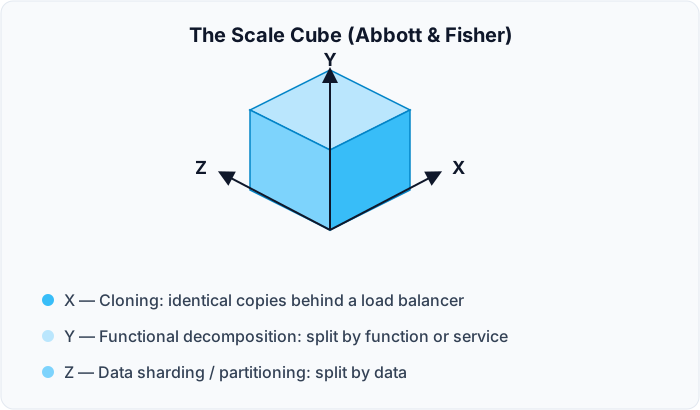
| Axis | Meaning | Applicability |
|---|---|---|
| Y axis | Functional decomposition | Can be applied to any system — monolith or distributed |
| X axis | Cloning | Applied to distributed systems; beneficial when some elements can be cloned — stateless design, load balancing |
| Z axis | Data sharding / partitioning | Applied to data infrastructure. Not every system can benefit — sharding/partitioning is a challenging concept for many databases |
Selected scalability rules (Abbott, Scalability Rules)
Mostly applicable to web information systems.
| Rule | Content |
|---|---|
| 19 | BASE — an acronym for architectures that solve CAP: "basically available, soft state, and eventually consistent." By relaxing the ACID property of consistency we gain greater flexibility in how we scale; a BASE architecture allows databases to become consistent eventually. Frequently used in NoSQL databases |
| 25 | Use cache to help scale the persistence layer |
| 29 | Always have the ability to roll back code. Ensure that all releases can roll back, practise it in a staging or QA environment, and use it in production when necessary to resolve customer incidents. If you haven't experienced the pain of not being able to roll back, you likely will at some point if you keep playing with the "fix-forward" fire |
| 35 | Don't use SELECT * in queries. Two primary problems: the probability of data-mapping problems, and the transfer of unnecessary data |
| 46 | Do not rely on vendor products, services or features to scale your system. Keep your architecture simple, your destiny in your own hands, and your costs in control. All three can be violated by relying on a vendor's proprietary scaling solution |
| 50 | Be competent, or buy competency in, for each component of your architecture. To a customer, every problem is your problem — you can't blame suppliers or providers. You provide a service, not software. Don't confuse competence with build-versus-buy or core-versus-context decisions: you can buy solutions and still be competent in their deployment and maintenance. In fact your customers demand that you do |
Other high-level influences on scalability: whether the system leverages on-premise or cloud infrastructure (hybrid approaches and private clouds exist, and hybrid is becoming more common for medium and large systems); stateful or stateless design, where stateless components generally scale better but at the cost of storing state externally and making extra calls to get and save state data. Scalability testing is challenging and tightly related to performance testing.
Listen to your clients but always try to differentiate the real needs of the business from the wishes of very specific stakeholders. Ultimate scalability is very expensive to achieve — be mindful whether it is what is really needed.
Reliability, faults, errors, failures
Reliability is tightly coupled with fault tolerance, and under some conditions can be treated as a synonym — though not in all cases. Some sources don't define reliability as standalone and unite it with availability: "in fact, availability builds upon the concept of reliability by adding the notion of recovery — that is, when a system breaks, it repairs itself."
The precise chain (Hanmer, Patterns for Fault Tolerant Software):
| Term | Definition |
|---|---|
| Failure | Occurs when the delivered service no longer complies with the specification — the agreed description of the system's expected function or service. Examples: the system crashes to a stop when it shouldn't; it computes an incorrect result; it is not available for service; it is unable to respond to user interaction. Whenever the system does the wrong thing it has failed. Failures are detected by the observer and users of the system |
| Error | That part of the system state liable to lead to subsequent failure; an error affecting the service is an indication that a failure occurs or has occurred. It is incorrect system behaviour from which a failure may occur. Two types: timing or value. Value errors might be incorrect discrete values or incorrect system state; timing errors can include total non-performance (the time was infinite) |
| Fault | The adjudged or hypothesized cause of an error — the defect present in the system that can cause an error, the actual deviation from correctness. In a program it is the misplaced comma or period, or the missing break in a C++ switch. Colloquially called a "bug". It might be a latent software defect, or a garbled message received on a communications channel. In general, neither the software nor the observers are aware of the presence of a fault until an error occurs |
Common errors:
- Timing or race conditions — communicating processes get out of synchronization and a race for resources occurs
- Infinite loops — continuous execution of a tight loop without pausing and without acknowledging others' requests for shared resources
- Protocol errors — errors in the messaging stream from non-conformance with the protocol: unexpected messages, messages sent at inappropriate times, or out of sequence
- Data inconsistency — data differs between two locations, e.g. memory and disk, or between different network elements
- Failure to handle overload conditions — the system is unable to handle the workload
- Wild transfer or wild write — data written to an incorrect memory location, or a transfer to an incorrect location, if there is a fault
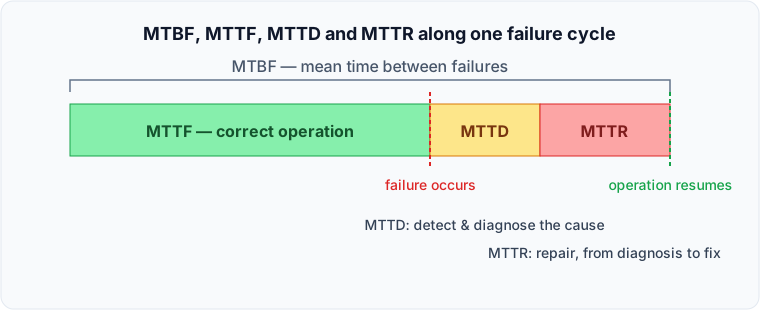
These reliability metrics compose along a single failure cycle rather than standing alone: MTBF (mean time between failures) spans the whole interval from one failure to the next, and decomposes into MTTF (the correct-behaviour time before a failure), MTTD (mean time to diagnose — the time spent detecting and localising the cause once a failure has occurred) and MTTR (mean time to repair, from diagnosis to restored correct behaviour). The availability formula above uses MTTR to cover diagnose-plus-repair unless MTTD is tracked and budgeted separately, which matters when triaging where an incident's time actually went.
There is a special mindset for developing fault-tolerant systems, and key principles — some applicable to all systems, others only under certain conditions. Running experiments directly in production implies substantial maturity in monitoring, recovery and resiliency; it is not recommended unless you satisfy all the prerequisites and understand the potential impact of the worst case.
Netflix is the industry's good example of a highly reliable fault-tolerant system, running tests directly in production to evaluate and measure the impact of removing components or injecting errors into the execution flow. Some elements remove components running in production; others search for unused resources and non-compliance and apply fixes; yet others search for security vulnerabilities. These approaches proved efficient for achieving high reliability, but again are not recommended without mature operations and monitoring practices and a robust environment and architecture supporting resiliency and self-healing.
That mindset starts from a single core question — what can go wrong in any given situation? — and works outward from it: eliminate potential single points of failure, make deliberate trade-offs rather than accidental ones, keep the design simple (KISS), and follow established design and coding practices. Where a computation is critical enough to justify the cost, N-version programming — running independently developed implementations of the same function in parallel and comparing their outputs — is the tactic of last resort for masking a design fault that redundancy alone cannot catch, since identical replicas would simply repeat the same bug.
Availability mathematics
Almost any software SLA tries to provide availability claims. Scheduled downtimes may not be considered when calculating availability, because the system is deemed "not needed" then — but of course this depends on the specific requirements, often encoded in the SLA.
| Nines | Approximate downtime per year |
|---|---|
| 99% | ~3.65 days |
| 99.9% | ~8.76 hours |
| 99.99% | ~52.6 minutes |
| 99.999% | ~5.26 minutes |
The conclusion from real IT industry examples is that achieving more than 99% availability may be much more challenging than it seems at first glance. When someone requests more than three nines availability, be extra careful — if that is a real requirement, it will be very expensive to achieve.
Composition rules (the practical formulas from the Module 9 homework guide, which are the same maths you need here):
Series — components that are single points of failure — multiply:
$$A_{total} = A_1 \times A_2 \times A_3 \times \dots \times A_n$$
Redundancy of m identical copies of a component — one minus the probability that all copies are unavailable:
$$A_{component} = 1 - (1 - A_1)^m$$
A component's total fair availability includes both the infrastructure it runs on (hardware + OS + provided software) and the software itself, because each can fail:
$$A_{component} = A_i \times A_s$$
Both formulas assume the basic scenario: copies are fully identical with the same availability and work constantly (no partial operation or unequal availability), and one software component runs per one infrastructure component — virtualisation with VMs and containers makes the calculation more complex.
Cloud specifics. Often you use existing IaaS/PaaS/SaaS services, so you do not calculate availability from scratch but rely on the numbers published by the provider — use the service SLA to estimate total availability. What adds real complexity is that each cloud can use its own definitions (for example, what "unavailability" means) and can have many exclusions, so always read what is written at the end of the agreement.
The tricky example: Amazon's SLA for EC2 uses a region-based approach and provides a fixed 99.99% only if you run EC2 in 2 or more Availability Zones — and this number does not increase if you use 3 or more zones. As a result, 99.99% is the maximum for one region. If you want better, you need to plan across different regions.
The formulas apply to both software and hardware components. SEI availability tactics include the obvious and popular ones: Monitor, Heartbeat, Redundancy, Exception Handling, Retry.
Security in depth
Threat modelling is the technique and toolset that helps understand potential security challenges and concerns — for example investigating how secure a web service and its environment are. You usually need a security expert involved in security design and testing if there are very specific and detailed security requirements; a security competence centre can perform threat modelling and other consulting as a service.
Concretely, threat modelling runs as five steps: identify the elements (decomposing the system into its components and modules), identify the threats against each, document them, rate them, and determine the countermeasures and mitigations worth applying. The deliverable is typically a data-flow diagram annotated with trust boundaries, paired with a rated list of threats and mitigations — that pairing, not the STRIDE letters alone, is what a completed threat model looks like.
STRIDE is a threat classification model developed by Microsoft for reasoning about security threats. It was initially created as part of the threat modelling process and is used in conjunction with a model of the target system constructed in parallel, including a full breakdown of processes, data stores, data flows and trust boundaries.
| Letter | Threat |
|---|---|
| S | Spoofing |
| T | Tampering |
| R | Repudiation |
| I | Information disclosure |
| D | Denial of service |
| E | Elevation of privilege |
SEI organises its own security tactics catalogue around four response categories that parallel how Performance and Availability tactics are grouped: Detect Attacks (detect intrusion, detect service denial, verify message integrity, detect message delay), Resist Attacks (identify/authenticate/authorize actors, limit access and exposure, encrypt data, separate entities, change default settings), React to Attacks (revoke access, lock out the computer, inform actors, maintain an audit trail) and Recover from Attacks (restore state, maintain availability). Framing security tactics as a detect/resist/react/recover cycle is what lets an architect check coverage the same way they would for a fault-tolerance or performance design.
OWASP — an industry initiative gathering knowledge about the most common security threats and methods for preventing them. The OWASP Top Ten is a powerful awareness document representing a broad consensus about the most critical web application security flaws, produced by security experts worldwide and published annually. OWASP also provides a free tool for web application security testing that can be injected into a CI/CD pipeline to enable continuous security verification (DevSecOps).
Always understand your security testing methodology and strategy — other types such as penetration testing can be leveraged. Everything is driven by the requirements and the type of solution you are building.
Other quality attributes
You will find information on many other quality attributes, and that should not be a surprise: there is no single one-size-fits-all list. Refer to ISO/IEC 25010 section 4.2 for a substantial list.
Remember: knowing quality attribute lists, tactics and patterns is a very good starting point for having proper conversations with clients. For creating good architectures you have to analyse the broader picture — other ASRs, business needs, industry reference architectures and similar.
Common pitfalls in ASR gathering
| Pitfall | Description |
|---|---|
| The "shopping cart" mentality | Stakeholders' false impression that specifying requirements is like filling up a shopping cart |
| The "this is too technical for me" attitude | Stakeholders treating ASR gathering as less important than, for example, use-case modelling |
| The "all requirements are equal" fallacy | Giving all requirements the same priority — mostly as high |
| The "requirements that can't be measured" syndrome | "The system must be always available and very performant" |
| The "not enough time" complaint | — |
| The "all stakeholders are alike" misconception | Address the right questions to the right people — always classify stakeholders as learned in Business Architecture |
Making quality attributes measurable
A quality attribute you cannot measure is not a requirement, it is a wish. The table below is a compiled metric vocabulary per attribute — it is what "define a set of measurable metrics" actually means. The guidance: select the 3–5 most important quality attributes, give the motivation for selecting each, list them for both baseline and target architecture, and note the component where each metric is measured.
| Quality attribute | Candidate measurable metrics |
|---|---|
| Conceptual Integrity | List of design patterns and styles to be used; afferent coupling (Ca); efferent coupling (Ce) |
| Maintainability | Cyclomatic complexity; type size; percentage of comments; efferent coupling at type level (Ce) |
| Re-usability | List of exact components/libraries that must be re-usable; re-usable code base percentage |
| Availability | Availability excluding planned downtime (%); planned downtime (minutes per day/week/month); time required to update software/hardware on the running system (minutes) |
| Interoperability | List of exact supported integration protocols/standards; backward compatibility for integration API (%); integration API breaking changes (%) |
| Manageability | System logs collected (yes/no); logging level changeable at runtime (yes/no); troubleshooting tools exist, actual, documented and known to administrators (yes/no); monitored by third-party tools (yes/no); exact list of information collected/traced/monitored for diagnostics and troubleshooting |
| Performance | Estimated end-users by location (total); concurrent users per location (average/peak); data storage size and estimated growth per year; number of records/documents in storage; mean page load time (ms); mean function call time (ms) |
| Reliability | Failure rate (failures per unit time); MTTF; MTTR; MTBF; time to switch to disaster recovery environment (seconds); number of Critical and High severity customer-reported bugs |
| Scalability | Architecture allows horizontal scaling (yes/no); time to scale up/down (seconds/minutes); scaling limits sufficient for the domain (servers, network bandwidth, disk); exact components that must scale out; exact scale-out conditions |
| Security | PII security scenarios; ability to detect DDoS (yes/no); ability to react to DDoS (yes/no); access restricted by authentication/authorization (yes/no); prevents SQL injection (yes/no); prevents XSRF/CSRF (yes/no); secured connection (yes/no); password encryption (yes/no); audits and logs all user interaction for critical operations (yes/no); sensitive data protected — encrypted, not logged, secure channels only |
| Testability | Unit test coverage (%); integration test coverage (%); exact list of required test environments (functional, performance, security); exact list of test approaches (manual/automated, unit, end-to-end, regression, integration) |
| Auditability | List of operations that must leave an audit trail in 100% of cases; exact parameters about users and their activities recorded for audit |
| Usability | Reference to the specific UI/UX guideline to follow; list of devices, resolutions, OS versions, browsers/versions, locales/cultures to support; Section 508 support for people with disabilities (yes/no); accelerators such as hotkeys and suggestion lists; number of clicks to reach particular functionality; mean time for an average user to get used to the system (minutes) |
Quality attributes under a service-oriented architecture
Quality Attributes and Service-Oriented Architectures (SEI, CMU/SEI-2005-TN-014) exists because software architecture is the bridge between mission/business goals and a software-intensive system, and quality attribute requirements drive architecture design — so it matters how a chosen style supports them.
The report's status column rates the maturity of SOA in each area: green = known solutions on relatively mature standards and technology; yellow = some solutions exist but need further research to prove usefulness; red = standards and technology immature, significant further effort required.
| Quality attribute | SOA's effect | Status |
|---|---|---|
| Interoperability | Underlying standards give good interoperability technology-wise, letting services built in different languages on different platforms interact. However semantic interoperability is not fully addressed — those standards are immature and still being developed | 🟢 Green |
| Extensibility | Extending an SOA by adding new services or incorporating additional capabilities into existing ones is well supported — but the interface/formal contract must be designed carefully so it can be extended without breaking consumers | 🟢 Green |
| Reliability | Problems can occur in many areas, but WS-Reliability and WS-ReliableMessaging should mean messages are transmitted reliably. Service reliability is still an issue | 🟡 Yellow |
| Availability | It is up to the service users to negotiate an SLA setting an agreed level of availability with penalties for noncompliance. Availability improves if a provider builds in contingencies such as exception handling that dynamically locates another source for the needed service | 🟡 Yellow |
| Usability | May decrease if the services support human interaction and there are performance problems with those services | 🟡 Yellow |
| Scalability | There are ways to handle more service users and more requests, but these solutions require detailed analysis by the providers to ensure other quality attributes aren't negatively impacted | 🟡 Yellow |
| Adaptability | SOA should have a positive impact, as long as the adaptations are anticipated. But it is left up to users and providers and no standards support it; must be managed in coordination with stability and performance | 🟡 Yellow |
| Operability and Deployability | Operating and deploying services and systems that use them requires deliberate support | 🟡 Yellow |
| Security | The need for encryption, authentication and trust requires detailed attention within the architecture. Many standards are being developed (SAML, XACML) but most are still immature | 🔴 Red |
| Performance | SOA can have a negative impact due to network delays, the overhead of looking up services in a directory, and XML parsing in web services. The architecture must be evaluated carefully and providers must design and evaluate their services carefully | 🔴 Red |
| Testability | Negatively impacted by the complexity of testing services distributed across a network. Those services might be provided by external organisations with no source code access, and if they implement runtime discovery it may be impossible to identify which services are used until the system executes | 🔴 Red |
| Auditability | Negatively impacted if end-to-end auditing capabilities aren't built in by the service users | 🔴 Red |
The report's own caveat, which is the real lesson: as with any architecture, trade-offs between quality attribute requirements must be made, and the resulting decisions may impact the organisation's ability to meet its business goals. In each system the quality attributes must be characterised specifically — using scenarios — and then weighed against this information.
Worked example — ASRs for Lumen Diagnostics
The Module 3 exercise done against the case study. The Priority column carries two values: business value and architectural impact, in that order.
Functional ASRs
Most functional requirements are not architecturally significant. These are, and note how many of them are about integration — that is the usual pattern.
| # | Functional ASR | Bus | Arch | Why it is architecturally significant |
|---|---|---|---|---|
| F01 | Intelligent search across partner availability and manually uploaded slots | M | H | Cannot be served from the transactional store at acceptable latency — implies a dedicated search component and an indexing path, which changes the data flow |
| F02 | Automated integration with one partner group's scheduling API | M | M | Introduces an outbound synchronous dependency on a third party, with its own failure and latency behaviour |
| F03 | Manual integration path for the remaining ~600 partners | M | H | Two very different ingress paths for the same domain concept. Points to one partner-availability API consumed by both the manual upload UI and the automated adapter, rather than two parallel implementations |
| F04 | The appointment workflow must be changeable and extensible after go-live | H | H | The stage list is stated as a requirement and as something that will change. Hard-coding the seven stages fails the second half — pushes toward an externalised workflow definition |
| F05 | Consolidate multiple studies for one patient into a single visit | M | M | Introduces a grouping aggregate above the appointment, affecting the domain model and the booking transaction boundary |
| F06 | Single sign-on across patient and administration portals | M | M | Determines the identity architecture and the trust boundary between patient-facing and staff-facing surfaces |
Quality attribute ASRs
| # | QA ASR | Bus | Arch | Note |
|---|---|---|---|---|
| QA01 | Patient and Administration portals available 99.9%; Partner portal 99% | M | H | Negotiate this. Availability is priced in redundancy — see the cost-of-outage arithmetic in Module 6 before agreeing a figure |
| QA02 | Routine screens respond within 2 s at the 95th percentile | H | H | The customer said "feel immediate". This makes it testable: a percentile, not an average |
| QA03 | Daily operational reports within 60 s; analytical reports within 10 minutes | M | M | Splits reporting by class, because one number for both is unachievable or wasteful |
| QA04 | Full functionality on phones and tablets | H | H | Forces the native-versus-responsive-web decision, which is architectural, not cosmetic |
| QA05 | Patient data held in the jurisdiction where it was collected | H | H | Given planned expansion outside the current jurisdiction, this constrains the deployment topology and the data model |
| QA06 | Support 4,200 concurrent users, absorbing 12% annual growth | H | H | Derived from 52,000 named users at ~8% concurrency, plus the stated growth assumption |
| QA07 | Serve new regions; outside the primary region p95 must not degrade by more than 50% | M | H | Turns "we will enter two more regions" into a measurable latency obligation |
| QA08 | Promotion of a release causes no more than 10 minutes of reduced service | M | M | Makes "robust promotion procedures" measurable, and effectively selects a deployment strategy |
| QA09 | All authenticated traffic over TLS 1.3 or better | M | M | Already specific in the source — carry it through unchanged |
| QA10 | A clinical-protocol or policy change is applied by the configuration team within one working day, without a code change | H | M | The only way to make "configurable enough to absorb change" mean anything |
| QA11 | Referral-system changes are reflected in the platform within 15 minutes | H | M | Makes "frequent synchronisation" a number |
Constraints
| # | Constraint | Bus | Arch | Note |
|---|---|---|---|---|
| C01 | Delivered as a service, hosted and operated by the Supplier | H | H | Places the system outside the customer's network — every integration becomes an external call, with the security and latency consequences that follow |
| C02 | Web UI on currently supported framework versions; exact list agreed at discovery | M | M | Records the vague "current web technologies" line as the constraint it actually is, and defers the specifics honestly |
The utility tree that follows
| QA | Refinement | Scenario | Priority |
|---|---|---|---|
| Performance | Response time | Routine screens respond within 2 s at p95 under normal load | H, H |
| Performance | Response time | Daily reports within 60 s; analytical reports within 10 min | M, M |
| Performance | Geographic latency | Outside the primary region, p95 degrades by no more than 50% | M, H |
| Compliance | Data residency | Patient data remains in the jurisdiction of collection | H, H |
| Security | Transport | All authenticated traffic uses TLS 1.3 or better | M, M |
| Reliability | Availability | Patient and Administration portals 99.9% | M, H |
| Reliability | Availability | Partner portal 99% | M, M |
| Scalability | Capacity | 4,200 concurrent users, absorbing 12% annual growth | H, H |
| Scalability | Extensibility of reach | Two additional regions within three years | M, H |
| Portability | Client reach | Full functionality on phones and tablets | H, H |
| Configurability | Reaction to change | Protocol or policy change applied within one working day, no code change | H, M |
| Deployability | Release impact | No more than 10 minutes of reduced service on promotion | M, M |
| Interoperability | Synchronisation | Referral-system changes reflected within 15 minutes | H, M |
| Maintainability | Operating model | Delivered as a service, hosted by the Supplier | H, H |
Notice the problem this tree exposes: five scenarios came out (H, H). That is not a result, it is a symptom — it means the prioritisation has not really been done. Before choosing tactics, go back to the stakeholders and force the ranking. Here, taking Compliance, Scalability and Performance as the top three is a defensible reading, because data residency is a legal precondition, capacity is a growth precondition, and response time is what every user experiences on every interaction.
Tactics for the top three
| QA and scenario | Tactic | How it applies here |
|---|---|---|
| Compliance — patient data stays in its jurisdiction | Data localisation | Enumerate every jurisdiction the network operates in, including the two planned regions. Select a provider with a regional presence in each |
| Partition by jurisdiction | One patient-data store per region; route at the identity boundary so a request is bound to its region before it touches patient data | |
| Keep the global layer non-identifying | The cross-region index holds only opaque keys and non-identifying attributes, so search and reporting work globally without moving regulated data | |
| Scalability — 4,200 concurrent users, 12% growth | Scale out (X axis) | Stateless application tier behind a load balancer; autoscale on request-queue depth rather than CPU, because the workload is I/O-bound on partner APIs |
| Partition data (Z axis) | Region is already the partition key imposed by the compliance tactic — reuse it rather than inventing a second scheme | |
| Scale up the data tier | Managed database with read replicas serving the reporting and search-indexing paths | |
| Performance — routine screens within 2 s at p95 | Response-time budget | Decompose the 2 s across gateway, application, partner call and data access, and hold each to its share — see the technique in Module 6 |
| Cache with event-driven invalidation | Cache partner availability with a short TTL, invalidated by partner update events rather than waiting for expiry | |
| Separate the read model | Reporting reads a projection, not the transactional store, so a heavy report cannot degrade booking latency |
How each is verified at a release checkpoint
- Compliance — automated test asserting that a request carrying a region-A patient identifier cannot read or write region-B storage; plus an infrastructure audit of store locations
- Scalability — load test to 4,200 concurrent sessions plus 12%, observing that autoscaling engages and p95 holds; confirm scale-in also works, since only scaling out is usually tested
- Performance — synthetic transactions per screen class reporting p95 continuously, with the per-component budget instrumented so a regression identifies which component consumed its share
How ASR extraction goes wrong
These are the failure modes worth rehearsing, because they recur on nearly every engagement.
Copying instead of reformulating. A requirement lifted verbatim from the customer's document inherits its vagueness. If you cannot state the response measure, you have not finished writing the ASR.
Missing the architecturally significant functional requirements. Teams scan for quality attributes and skip the functional list entirely — but integration requirements hide there, and they are the ones that reshape the architecture. "One partner is automated, six hundred are manual" is a functional requirement with more architectural consequence than most of the quality attributes.
Discarding a generic phrase instead of clarifying it. "Highly configurable to support growth" is not usable as written — which makes it a requirement that needs a conversation, not one to drop. Dropping it is how you discover at UAT that configuration was expected to be self-service.
Confusing a testable requirement with a constraint. "One coherent look and feel across every portal" is a requirement you verify; it is not a constraint that removes design freedom. Filing it as a constraint hides it from the test plan.
Confusing interoperability with portability. Interoperability is about the quality of an integration — protocol, format, latency, error semantics. Portability is about running in a different environment. An integration is usually both a functional requirement (we must integrate) and a quality attribute requirement (within 15 minutes, over TLS, with defined failure behaviour).
Offering process measures as architectural tactics. "Ensure the team includes experienced operations engineers" may be sound advice and is not an architectural tactic. A tactic is a design decision about the system. Similarly, "it will be hosted by the supplier" is a constraint that creates quality attribute problems; it does not solve any.
Not separating assumptions from stated requirements. Where you assume a figure because none was given, mark it visibly. Otherwise your assumption is indistinguishable from the customer's commitment, and nobody ever revisits it.
Accepting an availability figure without pricing it. Nines are bought with redundancy, and each nine costs multiples of the last. If you cannot show the cost of an outage hour, you cannot tell whether the number you have been handed is too strict or too lax — which is why Module 6 derives the figure from the business arithmetic instead.
Exercises — Module 3
Task. Extract ASRs from Lumen Diagnostics and turn the quality-attribute ones into a utility tree plus tactics. Output: ASR list (functional / QA / constraints), utility tree, top-3 tactics with how you apply them to Lumen, and how you will check them at a release checkpoint.
ASRs
- Read the Lumen Diagnostics case
- Read the ASR characterisation article in the materials first
- List only ASRs, in three sections: Functional, Quality Attributes, Constraints
- Reformulate every ambiguous requirement; do not copy the customer's wording
- Prioritise each ASR on business value and architectural impact
- Write a short rationale for why each one is architecturally significant
Utility tree
- Build a utility tree of QA requirements (SEI drawing, or a table)
- QA only (constraints optional); no functional ASRs
- H / M / L from both the business and architectural views
- Mark assumptions visually, distinct from stated requirements
- Example: you set availability to 99.9% because the brief gave no figure
Tactics
- Learn tactics from Software Architecture in Practice (and any other source you cite)
- From H,H / H,M / M,H scenarios, pick the top-3 quality attributes
- Choose tactics and show how they apply to Lumen, not a random SEI list
- Describe how you will check those attributes at a release checkpoint