Real data comes in groups: the lines of a file, the rows of a table, the settings of a program, the words in a document. Python's four built in collections, list, tuple, dict and set, cover most of these needs, and the standard library adds specialised tools for counting, grouping, queues, priority queues and sorted data.
This unit goes through what each collection is good at and the methods you will use daily. It then shows comprehensions, the compact syntax for building one collection from another, and ends with a table to help you choose the right structure.
You will be able to:
- Use list methods,
sort()andsorted()withkeyandreverse, and slice assignment - Pack and unpack tuples, including one element tuples and starred names
- Use dict methods (
get,setdefault,pop,|) and views, and rely on insertion order - Combine sets with set operators and choose between
discard()andremove() - Write list, dict and set comprehensions and generator expressions, and tell when a loop is clearer
- Choose a tool from
collections,heapqandbisectfor counting, grouping, queues and sorted data
Lists
A list is a mutable, ordered sequence. It can grow and shrink, and its items can be of any type, although in practice a list usually holds items of one kind.
| Method | Effect |
|---|---|
append(x) | add one item at the end |
extend(iterable) | add every item of an iterable at the end |
insert(i, x) | insert x before position i |
remove(x) | remove the first item equal to x; ValueError if there is none |
pop(), pop(i) | remove and return the last item, or the item at i |
del lst[i], del lst[i:j] | delete by position or by slice (a statement, not a method) |
clear() | remove every item |
index(x), count(x) | position of the first x; number of items equal to x |
sort(), reverse() | reorder in place and return None |
copy() | a shallow copy, the same as lst[:] |
Pitfall.
append()adds its argument as one item, sotasks.append(["a", "b"])adds a nested list. Useextend()to add several items.
sort() versus sorted()
lst.sort() sorts the list in place and returns None. sorted(iterable) works on any iterable and returns a new list, leaving the original alone. Both accept reverse=True and key=, a function that is called on each item to produce the value to sort by. Python's sort is stable: items with equal keys keep their original order.
A key that returns a tuple sorts by several criteria: here by length, then alphabetically. You will often see short keys written as lambda expressions, for example key=lambda w: (len(w), w); Functions introduces them.
Pitfall.
words = words.sort()replaces your list withNone. Use eitherwords.sort()on its own line orwords = sorted(words).
Slice assignment
Assigning to a slice replaces that part of the list with the items of an iterable, which need not have the same length. It can insert, delete and replace in one step, and it changes the list object in place.
nums[1:1] = ... inserts without removing anything, and nums[:] = ... replaces the whole contents while keeping the same list, so alias sees the change. A slice with a step, such as nums[::2], can be deleted, but assigning to one needs exactly as many items as it selects; otherwise you get ValueError: attempt to assign sequence of size 1 to extended slice of size 3.
Tuples
A tuple is an immutable sequence. Use it for a fixed group of values whose positions have a meaning, such as a point (x, y) or a row (name, age). Use a list for a variable number of similar items.
It is the comma that makes a tuple, not the parentheses. 3, 4 is a tuple; (42,) is a one element tuple; (42) is the number 42 in parentheses; () is the empty tuple. Building a tuple from values is called packing; assigning a tuple's items to several names is unpacking, and a starred name collects the leftovers into a list.
Unpacking needs the number of names to match: a, b = [1, 2, 3] raises ValueError: too many values to unpack (expected 2, got 3) (the wording since 3.14; Python 3.13 stops at expected 2). Because a tuple is immutable, it is hashable when all its items are, so it can be a dict key or a set element, as the city pairs show. A tuple that contains a list is not hashable. Tuples have only two methods, count() and index().
Dicts
A dict maps keys to values. Each key appears at most once, and keys must be hashable (strings, numbers, tuples of those); values can be anything and may repeat. Looking up, adding or deleting a key takes about the same time however large the dict is. Dicts remember insertion order (guaranteed since Python 3.7): iteration follows the order in which keys were first added. That order is not a position, though: a dict is not a sequence, and d[0] looks up the key 0.
| Operation | Effect |
|---|---|
d[k] | the value for k; KeyError if it is missing |
d.get(k), d.get(k, default) | the value, or default (None if not given); never raises |
d[k] = v | add k, or replace its value |
d.setdefault(k, default) | return d[k], first inserting default if k is missing |
d.pop(k), d.pop(k, default) | remove k and return its value |
d.popitem() | remove and return the most recently inserted pair |
d1 | d2 | a new merged dict; on clashes the right side wins (3.9+) |
d1 |= d2, d1.update(d2) | merge d2 into d1 in place |
del d[k] | remove k; KeyError if it is missing |
k in d | test for a key |
keys(), values(), items() | live views of the keys, values and pairs |
setdefault() returns the list stored under the key, creating an empty one the first time, so .append() always has a list to work on. The defaultdict below does the same job more readably.
Merging, views and order
What to notice:
- In
a | bthe values frombwin, but keys already inakeep their position. dict(defaults)made a copy, sosettings |= userleftdefaultsunchanged.- A view is live:
keyswas created before"soup"was added and still shows it. - Changing the value of an existing key keeps its position; deleting a key and adding it again moves it to the end.
- Key views support set operations such as
&.
Sets
A set is an unordered collection of unique, hashable elements. The set itself is mutable: you can add and remove elements. Sets are ideal for removing duplicates, for fast membership tests and for comparing groups. {} is an empty dict; write set() for an empty set. A set is not a sequence either: it has no positions, so s[0] raises TypeError.
| Operator | Method | Elements in the result |
|---|---|---|
a | b | a.union(b) | in a or b |
a & b | a.intersection(b) | in both |
a - b | a.difference(b) | in a but not in b |
a ^ b | a.symmetric_difference(b) | in exactly one of them |
a <= b, a >= b | a.issubset(b), a.issuperset(b) | (a test, not a set) |
a.isdisjoint(b) | (a test: no common elements) |
The operators need sets on both sides; the methods accept any iterable, so a.union([5, 6]) works. Sets have no order, so the examples print sorted(...) to get a stable display.
- Adding an element that is already present changes nothing.
discard(x)does nothing ifxis missing;remove(x)raisesKeyError.pop()removes and returns an arbitrary element.- A
frozensetis an immutable, hashable set, so it can be a dict key or an element of another set. The two pairs above are equal because order doesn't matter in a set. - Elements must be hashable:
{[1, 2]}raisesTypeError, because a list can change.
Comprehensions
A list comprehension builds a list from an iterable in one expression: [expression for item in iterable if condition]. Read it as "the expression, for each item, where the condition holds". The if part is optional and filters items; a conditional expression at the front transforms every item instead.
Several for clauses run in the same order as nested loops would: for row in grid is the outer loop. A comprehension inside another, as in the last line, builds a list of lists; here it transposes the grid.
Curly braces make dict and set comprehensions:
Generator expressions
With parentheses instead of brackets you get a generator expression. It doesn't build a list; it produces one item at a time, when asked. That suits functions that consume items one by one, such as sum(), max(), any() or "".join(), and when it is the only argument the call's own parentheses are enough.
The list holds a million results and takes megabytes; the generator takes a couple of hundred bytes whatever the range. A generator can be consumed only once, which is why the second sum() is 0. Iterators and generators explains how this works.
When a loop is clearer
Comprehensions are for building a collection. Prefer an ordinary loop when:
- the body has side effects, such as printing or writing to a file;
[print(x) for x in items]builds a useless list ofNones - you need several statements, a
try/except, or more than one result per item - the comprehension needs more than two
forclauses, or conditions that you have to read twice
The loop variable of a comprehension exists only inside it and doesn't overwrite a variable of the same name outside. To filter on a computed value without computing it twice, you can use the walrus operator from Operators and expressions: [y for x in data if (y := score(x)) > 10].
The collections module
Counter
Counter is a dict subclass for counting hashable things. A missing key reads as 0, without being inserted.
most_common(n)returns a list of(element, count)pairs, highest count first; equal counts keep the order in which the elements were first seen.update()adds counts;subtract()takes them away and may leave zero or negative counts.+adds counts,-subtracts and drops results that are zero or below,&keeps the minimum of each count and|the maximum.total()(3.10+) is the sum of all counts, andelements()returns an iterator that repeats each element as many times as its count.
defaultdict
A defaultdict calls a factory function, such as list, int or set, to create a value for any missing key you access with d[key]. Grouping becomes one line:
Pitfall. Merely reading a missing key with
d[key]inserts it: printingby_initial["Z"]added a"Z"entry. Useinor.get()to look without inserting. Adefaultdictcreated without a factory,defaultdict(), raisesKeyErrorlike a plain dict.
deque
A deque (pronounced "deck") is a double ended queue: adding or removing at either end takes constant time. A list is fast only at its right end; lst.pop(0) and lst.insert(0, x) shift every other item. With maxlen, a deque keeps only the newest items, discarding from the opposite end as new ones arrive.
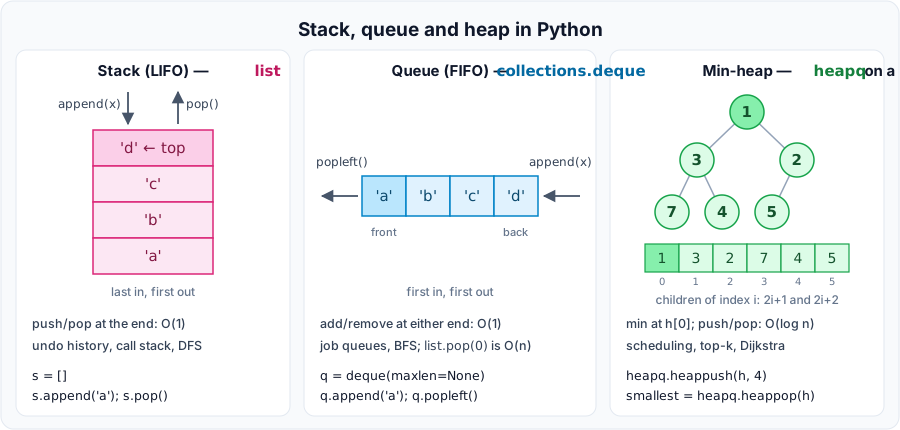
Indexing into the middle of a deque is slower than for a list, so use a deque for queues and sliding windows, not for random access. The figure compares the three classic structures: a list used as a stack (push and pop at the same end), a deque used as a queue (in at one end, out at the other) and a heap (the smallest item always comes out first, covered below).
namedtuple
namedtuple creates a tuple type whose positions also have names. It is a quick way to make a readable, immutable record:
_replace() returns a new record with some fields changed, and _asdict() returns a plain dict. For new code, typing.NamedTuple gives the same thing with type hints, and a dataclass is the usual choice for records that need defaults, methods or mutability; both are covered in Classes and objects.
OrderedDict
Plain dicts have kept insertion order since Python 3.7, so OrderedDict is no longer needed for that. It remains useful for three things: move_to_end(key) moves a key to the end (or, with last=False, to the front); popitem(last=False) removes the oldest entry; and two OrderedDicts are equal only if their keys are in the same order.
Moving each used key to the end and evicting from the front is the core of a "least recently used" cache. For caching function results, use functools.lru_cache instead (Functional tools and decorators). Comparing an OrderedDict with a plain dict ignores order.
ChainMap
A ChainMap groups several mappings into a single view, without copying them. A lookup searches the mappings in order and returns the first value it finds. The underlying mappings are listed in its .maps attribute, and changes to them show through. Writes and deletions go to the first mapping only. This suits layered settings, where command line options override user settings, which override defaults:
Setting "lang" wrote into cli, the first mapping, and left defaults untouched. Deleting a key that exists only in a later mapping raises KeyError. new_child() returns a new ChainMap with an extra empty mapping in front, which is handy for nested scopes.
heapq and bisect
Priority queues with heapq
A heap is a list arranged so that its smallest item is always at index 0. The heapq functions maintain that arrangement on an ordinary list: heappush() and heappop() take O(log n) time, and heapify() turns an existing list into a heap in O(n). The rest of the list is not sorted.
Tuples compare item by item, so (priority, job) pairs come out in priority order. If two priorities can be equal and the jobs can't be compared, insert a running counter as a tiebreaker: (priority, count, job). heapq is a min heap; for a max heap, push negated priorities, or since Python 3.14 use heappush_max(), heappop_max() and heapify_max(). nlargest() and nsmallest() are efficient for a small k; for large k, sorted() is simpler.
Sorted lists with bisect
bisect performs binary search on a list that is already sorted: it halves the search range at each step, so finding a position takes O(log n). bisect_left() returns the position before any equal items, and bisect_right() the position after them. insort() inserts an item at the right place; the search is fast, but the insertion still shifts later items.
On an unsorted list, bisect returns meaningless positions without any error. Since Python 3.10 the functions also accept key=.
Choosing a data structure
| Structure | Python | Fast operations | Everyday use |
|---|---|---|---|
| Dynamic array | list | index O(1), append/pop at end O(1) | ordered collections, a stack |
| Queue / deque | collections.deque | append/pop at both ends O(1) | job queues, BFS, sliding windows (maxlen) |
| Hash map | dict | get/set/delete O(1) average | lookups, counting (Counter), grouping (defaultdict) |
| Hash set | set, frozenset | membership O(1) average | deduplication, "seen" tracking |
| Binary heap | heapq on a list | push/pop O(log n), min O(1) | scheduling, top k, Dijkstra |
| Sorted array | list + bisect | search O(log n), insert O(n) | ranges, leaderboards |
| Tree | nested objects / dict; xml.etree | depends on shape | HTML/XML documents, file systems, decision trees |
| Graph | dict[node, set[node]]; graphlib for topological sort | neighbours O(1) | dependencies, routes, social links |
| Record | tuple, typing.NamedTuple, @dataclass | attribute access O(1) | rows, DTOs, return values |
Check yourself
- Why does
words = words.sort()lose your data, and what are the two correct forms? - How do you write a one element tuple, and what is
(42)? - When the key
kis missing, what dod[k],d.get(k)andd.setdefault(k, [])each do? - With
a = {"x": 1}andb = {"x": 2, "y": 3}, what area | bandb | a? - Why can
print(counts["new"])change adefaultdict? - When is a
dequea better choice than a list? - Give two situations where a
forloop is better than a comprehension. - What must be true of a list before you use
bisecton it?
Suggested answers
sort()sorts in place and returnsNone, which then replaces the list. Writewords.sort()alone, orwords = sorted(words).(42,), or42,: the comma makes the tuple.(42)is the int 42 in parentheses.d[k]raisesKeyError;d.get(k)returnsNoneand changes nothing;d.setdefault(k, [])insertskwith a new empty list and returns that list.{'x': 2, 'y': 3}and{'x': 1, 'y': 3}. The right hand operand wins on clashes.- Reading a missing key with
[]calls the factory and inserts the result. Use"new" in countsorcounts.get("new")to look without inserting. - When you add or remove at the left end (a queue), or need a bounded window of the newest items with
maxlen. - Any two of: the body has side effects such as printing; it needs several statements or a
try/except; it produces more than one result per item; the comprehension would need more than twoforclauses. - It must already be sorted (by the same key you search with). Otherwise the results are meaningless and no error is raised.
Exercises
These exercises are optional practice. Pick the ones that help you.
- Moving average. A sensor sends readings one at a time. Write
moving_averages(readings, k)that returns a list with one entry per reading: the average of the latestkreadings, or of all readings so far while there are fewer thank. Each step must take constant time, so keep the window in adeque(maxlen=k)together with a running total, instead of summing the window again. RaiseValueErrorifkis zero or negative. Readings[4, 8, 6, 10, 2]withk = 3→[4.0, 6.0, 6.0, 8.0, 6.0]. - Top three words. Write
top_words(text, n=3)that returns thenmost frequent words as(word, count)pairs. Ignore case, and strip punctuation from the ends of each word (string.punctuationlists the characters). Equal counts keep the order of first appearance. For"The cat sat. The dog sat too! A cat, a dog, the end."→[('the', 3), ('cat', 2), ('sat', 2)]. - Unique, in order. Write
dedupe(items)that removes duplicates but keeps the first occurrence of each item in its original position:[3, 1, 3, 2, 1]→[3, 1, 2]. Then writededupe_by(items, key), which treats two items as duplicates whenkey(item)is equal:dedupe_by(["Tea", "tea", "Cake", "TEA"], str.casefold)→["Tea", "Cake"]. - Group by first letter. Write
group_by_initial(words)that returns a dict from lowercase first letters, in alphabetical order, to the words starting with that letter in their original order. Skip empty strings.["banana", "apple", "Avocado", "blueberry", "", "cherry"]→{'a': ['apple', 'Avocado'], 'b': ['banana', 'blueberry'], 'c': ['cherry']}. - Merge many dicts. Write
merge(*dicts)that merges any number of dicts into a new one; when a key appears more than once, the last value wins. The inputs must not change, andmerge()returns{}. (*dictscollects all the arguments into a tuple; Functions explains it.)merge({"a": 1, "b": 2}, {"b": 3}, {"c": 4, "a": 5})→{'a': 5, 'b': 3, 'c': 4}. - Biggest spending category. Purchases are
(item, price_in_cents)pairs, and a separate dict maps each item to a category. Writebiggest_category(purchases, category_of)that returns(category, total_cents)for the category with the largest total, the first one seen on a tie. RaiseKeyErrorfor an item with no category andValueErrorfor an empty list. Test it with the purchases[("rice", 240), ("salmon", 1180), ("apples", 310), ("tuna", 650), ("pears", 290), ("rice", 240), ("oats", 190)], where rice and oats aregrains, salmon and tuna arefish, and apples and pears arefruit. The expected answer is('fish', 1830).
Solutions
1. Moving average. Before a full window accepts a new value, its oldest value is about to drop out, so subtract it from the total first. Every step does a fixed amount of work, whatever k is. The last check compares the result with a slow but straightforward version on random data.
With integer readings the running total is exact. With floats, each addition and subtraction can leave a tiny rounding error that accumulates over a long stream; recompute the total from the window from time to time, or use math.fsum(window). A non integer k such as 2.5 already fails inside deque() with TypeError.
2. Top three words.
3. Unique, in order. A dict keeps one entry per key in insertion order, so dict.fromkeys() does the whole job for hashable items. The seen set version also works with a key function.
4. Group by first letter.
5. Merge many dicts. Starting from a new empty dict guarantees that no input is modified.
6. Biggest spending category. Prices are whole cents, which keeps the totals exact. A Counter adds the amounts, and most_common(1) picks the largest, breaking ties by first appearance.