Most programs spend a lot of their time handling text: names, messages, file contents, web pages, log lines. In Python, text is a str: an immutable sequence of Unicode code points, the numbers Unicode gives to characters. This unit covers writing string literals, slicing them, the methods you will use every day, and building output with f-strings, from simple {name} substitution to aligned columns and formatted numbers and dates.
Encodings, bytes and Unicode normalisation have their own unit, Text, bytes and Unicode. Here you stay on the str side.
You will be able to:
- Write string literals with the right quotes, escapes and raw string prefix
- Index and slice strings, and explain why a string can't be changed in place
- Clean, search, split and join text with the core
strmethods - Format numbers, text and dates with f-strings and the format specification mini language
- Recognise
str.format()and%formatting in older code - Compare and sort strings correctly, including caseless comparison with
casefold()
Strings are immutable
A string can't be changed after it is created. Every method that seems to modify a string, such as upper() or replace(), returns a new string and leaves the original alone:
Assigning to a position is an error:
The traceback ends with TypeError: 'str' object does not support item assignment. To "change" a string, build a new one, as "J" + word[1:] did, and rebind the name if you want to keep it.
String literals
Single and double quotes make identical strings. Choose whichever avoids escaping: "it's" or 'she said "hi"'. Triple quotes (""" or ''') allow a string to span several lines and keep the line breaks. Two literals written next to each other are joined into one, which lets you split a long string over several lines inside parentheses.
A backslash starts an escape sequence:
| Escape | Meaning |
|---|---|
\n, \t | newline, tab |
\\ | one backslash |
\', \" | a quote character |
\u00e9, \U0001F600 | the code point with that hex number (4 or 8 digits) |
\N{GREEK SMALL LETTER ALPHA} | the code point with that Unicode name |
A raw string, written r"...", keeps every backslash as typed. Use raw strings for regular expressions (Regular expressions). For file paths, prefer pathlib, which accepts forward slashes on every operating system.
repr() shows a string the way you would type it, with quotes and escapes, which makes invisible characters visible. "\n" is one character; r"\n" is two.
Pitfall. An unknown escape such as
"\d"is kept as a backslash and ad, but since Python 3.12 it triggersSyntaxWarning: "\d" is an invalid escape sequence, and a future version will make it an error (Python 3.12 and 3.13 word the warning slightly differently). User"\d"or"\\d". A raw string also can't end with a single backslash:r"folder\"is a syntax error.
Indexing and slicing
Strings are sequences, so they share the indexing rules of lists and tuples. The figure uses a list, but the positions work the same way for the characters of a string.
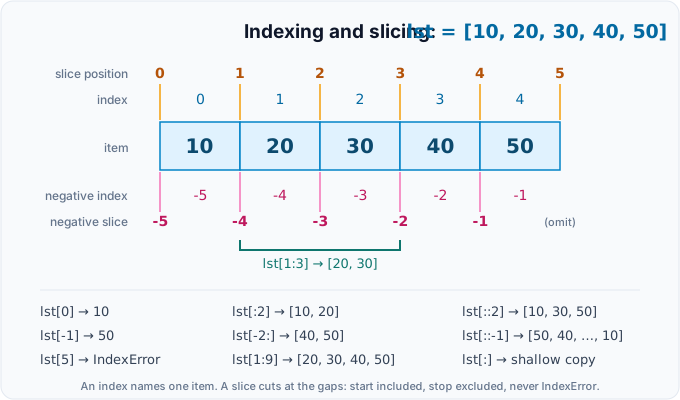
- Positions count from 0. Negative positions count from the end:
-1is the last item. s[start:stop]takes items fromstartup to, but not including,stop. Either end may be left out.s[start:stop:step]takes everystep-th item; a negative step walks backwards, sos[::-1]reverses.- An index outside the string raises
IndexError, but a slice that runs past the end is clipped and never fails.
A single character is a string of length 1; Python has no separate character type.
The core methods
The table lists the methods you will use most. All of them return new values; none changes the string.
| Method | What it does | Example | Result |
|---|---|---|---|
upper(), lower() | change case | "Ada".upper() | 'ADA' |
casefold() | lower case for caseless comparison | "Straße".casefold() | 'strasse' |
title() | capitalise each word | "ada lovelace".title() | 'Ada Lovelace' |
strip(), lstrip(), rstrip() | remove whitespace (or given characters) at the ends | " hi \n".strip() | 'hi' |
removeprefix(p), removesuffix(s) | remove one exact prefix or suffix (3.9+) | "v1.2".removeprefix("v") | '1.2' |
replace(old, new[, count]) | replace occurrences | "a-b-c".replace("-", "+") | 'a+b+c' |
find(sub), rfind(sub) | first or last position, or -1 | "banana".find("na") | 2 |
index(sub) | like find, but raises ValueError if absent | "banana".index("na") | 2 |
count(sub) | number of nonoverlapping occurrences | "banana".count("ana") | 1 |
startswith(p), endswith(s) | test the ends; accept a tuple of options | "a.png".endswith((".jpg", ".png")) | True |
split(sep=None, maxsplit=-1) | cut into a list | "a b c".split() | ['a', 'b', 'c'] |
sep.join(items) | glue strings together with sep between them | "-".join(["a", "b"]) | 'a-b' |
partition(sep) | split once into (before, sep, after) | "k=v=w".partition("=") | ('k', '=', 'v=w') |
isdigit(), isalpha(), isalnum(), isspace() | test every character (false for "") | "2026".isdigit() | True |
zfill(width) | pad with zeros on the left | "42".zfill(5) | '00042' |
ljust(w), rjust(w), center(w) | pad to a width | "hi".center(6, "*") | '**hi**' |
Cleaning text
Pitfall. The argument of
strip()is a set of characters, not a prefix or suffix."www.example.com".strip("w.moc")removes any ofw,.,m,o,cfrom both ends, leaving'example'. To remove an exact piece of text, useremoveprefix()andremovesuffix(). Also note thattitle()treats an apostrophe as the end of a word;string.capwords("they're here")gives"They're Here".
Searching
Use in when you only need yes or no. Use find() when "not there" is a normal outcome, and index() when it would be an error.
Pitfall. Never write
if text.find(sub):.find()returns0when the match is at the very start, which is falsy, and-1when there is no match, which is truthy: the opposite of what you want, as the last line shows. Writeif sub in text:.
Splitting and joining
split()with no argument splits on any run of whitespace and drops empty pieces. With an explicit separator it splits on every occurrence and keeps the empty pieces.maxsplitlimits the number of cuts;rsplit()cuts from the right.splitlines()understands\n,\r\nand the other line endings.join()is a method of the separator, and every item must already be a string;", ".join([1, 2])raisesTypeError. Convert first, for example withstr(n).partition()always returns three parts, sokey, _, value = line.partition("=")never fails, even when there is no=.
Testing characters and padding
isdigit() is true for a superscript two, yet int("²") raises ValueError. It also rejects "-5" and "12.5". So isdigit() is not a reliable "can I convert this?" test: call int() or float() and catch the error, as in the input loop of Control flow. Text, bytes and Unicode compares isdigit(), isdecimal() and isnumeric().
Building strings: join versus +
+ joins two strings and * repeats one ("-" * 20). Because strings are immutable, result += piece inside a loop creates a new, longer string on every pass, so the total copying can grow with the square of the number of pieces. CPython sometimes optimises this, but you shouldn't rely on it. The idiomatic pattern is to collect the pieces in a list and join them once:
In Collections and comprehensions you will write the same thing in one line: ", ".join(str(n * n) for n in range(1, 6)).
f-strings in depth
An f-string is a string literal with an f prefix. Each {...} inside it holds an expression; Python evaluates it and inserts the result. Write {{ and }} for literal braces.
Since Python 3.12 (PEP 701), the expression part is parsed like ordinary code. You can reuse the same quote character as the f-string itself, use backslashes, and split a long expression over several lines, even with # comments. Before 3.12, both print lines below were a SyntaxError:
Conversions and the = specifier
!s, !r and !a apply str(), repr() or ascii() to the value before it is formatted. A trailing = (since Python 3.8) prints the expression text, then =, then the value, which makes quick debugging output easy. Spaces around the = are kept in the output, and the value is shown with repr() unless you add a format spec.
The format specification mini language
After a colon, {value:spec} controls how the value is shown. The parts of a spec always appear in this order, and all are optional:
[[fill]align][sign][z][#][0][width][grouping][.precision][type]
| Part | Options | Example | Result |
|---|---|---|---|
| fill and align | < left, > right, ^ centre, = pad after the sign; any fill character before it | f"{'ab':*^6}" | '**ab**' |
| sign | + always, - only for negatives (the default), space: a space for positives | f"{5:+}" | '+5' |
z | turn a negative zero into zero after rounding (3.11+) | f"{-0.001:z.1f}" | '0.0' |
# | add the 0b, 0o or 0x prefix | f"{255:#x}" | '0xff' |
0 and width | pad numbers with zeros to the width | f"{42:05}" | '00042' |
| width | the minimum total width | f"{'ab':>5}" | ' ab' |
| grouping | , or _ between thousands | f"{1234567:,}" | '1,234,567' |
.precision | digits after the point (f, e, %), significant digits (g), or maximum length (strings) | f"{3.14159:.2f}" | '3.14' |
| type | d int, f fixed point, e exponent, g general, % percent, b binary, o octal, x/X hex, s string | f"{0.256:.1%}" | '25.6%' |
Strings are left aligned by default and numbers right aligned. The same spec works with the built in format(): format(1234.5, ",.2f") is '1,234.50'.
Nested specs and dates
A spec can itself contain {...} fields, which is useful when the width or precision is computed at run time. Dates and times define their own spec: the strftime codes such as %Y and %d (A tour of the standard library covers datetime).
Note. Python 3.14 added template strings (PEP 750).
t"Hello {name}"looks like an f-string, but it produces astring.templatelib.Templateobject instead of astr, so a library can inspect and process the inserted values (for example, escape them for HTML) before combining them. For everyday output, keep using f-strings.
Older formatting styles
You will meet two older styles in existing code and documentation. Recognise them; write f-strings in new code.
str.format()uses the same mini language after the colon. It is still handy when the template is stored apart from the values, for example astemplate.format(**values).%formatting is the oldest style, modelled on C'sprintf. Theloggingmodule still uses%-style placeholders (log.info("saved %s", path)) so that it can skip formatting messages that are filtered out.
Pitfall.
"%s" % valuebreaks whenvalueis a tuple:"%s" % (1, 2)raisesTypeError: not all arguments converted during string formatting. And never let users supply the template forstr.format(): a field such as{0.__class__}reads attributes of your objects. For user editable templates,string.Template($nameplaceholders) is the safer choice.
Wrapping text with textwrap
The textwrap module reflows plain text to a given width:
wrap() returns the lines as a list, and fill() joins them with newlines. shorten() collapses whitespace and cuts at a word boundary. indent() adds a prefix to each line. dedent() removes the indentation that all lines share, which lets you indent a triple quoted string along with your code; the backslash after the opening """ stops the string starting with a newline.
Comparing and sorting strings
== compares strings exactly, including case. < and > compare code point by code point, so every ASCII capital letter sorts before every lowercase letter, and digits are compared as characters, not as numbers. For case insensitive sorting, pass key=str.casefold; for case insensitive equality, compare the casefold() of both sides.
casefold() is a stronger lower() designed for comparisons: it turns the German ß into ss, for example. It does not, however, make é written as one code point equal to e followed by a combining accent; for that you need Unicode normalisation, covered with encodings in Text, bytes and Unicode.
Check yourself
- Why does
word[0] = "J"fail, and how do you get"Jython"from"Python"? - What do
"Python"[1:4],"Python"[-2:]and"Python"[::-1]give? - Why is
"www.example.com".strip("w.moc")equal to"example", and what should you use instead? - What is wrong with
if text.find("x"):? - How do
"a b".split()and"a b".split(" ")differ? - Which f-strings print
1234567.891as1,234,567.89and0.256as25.6%? - What does
f"{total=}"print whentotalis 42? - Why should a caseless comparison use
casefold()rather thanlower()?
Suggested answers
- Strings are immutable, so their characters can't be assigned. Build a new string:
"J" + word[1:]. 'yth','on'and'nohtyP'.strip()treats its argument as a set of characters and removes any of them from both ends. Useremoveprefix("www.")andremovesuffix(".com").find()returns0(falsy) for a match at the start and-1(truthy) for no match. Useif "x" in text:.- With no argument,
split()treats any run of whitespace as one separator:['a', 'b']. With" ", every single space separates, giving['a', '', 'b']. f"{1234567.891:,.2f}"andf"{0.256:.1%}".total=42.casefold()handles more cases, such asßmatchingss, so"Straße"and"STRASSE"compare equal.
Exercises
These exercises are optional practice. Pick the ones that help you.
-
Initials. Write
initials(full_name)that returns the capitalised first letter of each word, each followed by a full stop. Extra spaces don't matter."ada lovelace"→"A.L.";" grace brewster hopper "→"G.B.H.";""→"". -
Slugs. Write
slugify(title)for web addresses: lowercase the text, keep ASCII letters and digits (ch.isascii() and ch.isalnum()), and turn every run of other characters into a single hyphen, with no hyphen at either end." Hello, World! Python 3.15 "→"hello-world-python-3-15";"--Already--Slugged--"→"already-slugged". -
Receipt. Given
[("Tea", 2, 2.5), ("Carrot cake", 1, 3.75), ("Soup of the day", 1, 4.2)]as (item, quantity, unit price), print one line per item with the name left aligned in 16 characters, the quantity right aligned in 3 and the line total right aligned in 8 with two decimals; then a rule of 27 hyphens, and a total line with the labelTotalaligned left in 19 characters and the sum aligned right in 8. Expected output: -
Sentence palindromes. Write
is_palindrome(text)that ignores case, spaces and punctuation (keep only characters for whichisalnum()is true)."Never odd or even"→True;"Was it a car or a cat I saw?"→True;"Python"→False;""→True. -
Masked card number. Write
mask(card)that replaces every digit except the last four with*and keeps separators as they are."4111 1111 1111 1111"→"**** **** **** 1111";"4111-1111-1111-1111"→"****-****-****-1111";"123"→"123". -
Settings line. Write
parse_setting(line)that splitskey = valueat the first=, strips both parts, lowercases the key and returns(key, value). RaiseValueErrorif there is no=or the key is empty." Timeout = 30 "→("timeout", "30");"url=https://example.com/?a=1"→("url", "https://example.com/?a=1");"no equals sign"→ValueError.
Solutions
1. Initials.
2. Slugs. The flag pending_hyphen records that a separator was seen, and the hyphen is only written before the next kept character. That collapses runs and leaves none at either end.
3. Receipt.
For real money, store amounts as Decimal or as whole cents (Values, names and types); the formatting stays the same.
4. Sentence palindromes.
5. Masked card number. Counting digits from the right decides which ones stay visible; separators are copied unchanged.
6. Settings line. partition() splits at the first = only, so values may contain more = signs.