A function is a named, reusable block of code. You give it inputs, it does one job, and it hands back a result. Functions let you name an idea once, test it once and reuse it everywhere, which is how small scripts grow into programs you can still read.
This unit goes beyond the syntax. You will meet every kind of parameter Python offers, see why a list used as a default value is a classic bug, find out what really happens to an argument when you pass it, and learn how Python decides which variable a name refers to.
You will be able to:
- Define functions with docstrings and type hints, and return one value or several
- Choose between positional, keyword, default,
*args/**kwargs, positional only and keyword only parameters - Avoid the mutable default argument trap with a
Nonesentinel - Explain call by sharing: why the caller sees a mutation but not a rebinding
- Predict name lookup with the LEGB rule and use
globalandnonlocalcorrectly - Write closures, short lambdas and recursive functions, and recognise
RecursionError
Defining and calling a function
def creates a function. The names in parentheses are its parameters; the values you pass in a call are arguments. The indented body runs only when the function is called. return ends the call and sends a value back; a function that finishes without return, or with a bare return, gives back None.
A function returns exactly one object, but that object can be a tuple: return a, b packs two values, and the caller can unpack them. The first statement of the body may be a docstring, a string that documents the function. PEP 257 asks for triple double quotes and a one line summary phrased as a command ("Return...", not "Returns...") and ending in a full stop. Python keeps it in __doc__, and help() displays it.
greet displays text, but its result is None, so you can't use it in a calculation. Prefer functions that return values and leave printing to the caller: they are easier to test and to combine. Function names follow the rules from Values, names and types and, by PEP 8, are written in snake_case; a verb phrase such as load_orders or is_valid reads best.
Parameters and arguments
Positional, keyword and default arguments
A positional argument is matched to a parameter by its position. A keyword argument names the parameter, so its position doesn't matter. Positional arguments must come first, and no parameter may receive two values. A parameter with a default value becomes optional; parameters with defaults must follow those without, or Python reports SyntaxError: parameter without a default follows parameter with a default.
The mutable default trap
Python evaluates a default value once, when the def statement runs, and stores that one object in the function's __defaults__. If the default is mutable, such as a list or a dict, every call that relies on it shares, and changes, the same object.
The fix is to use None as a sentinel, a marker meaning "no value given", and create a fresh object inside the body:
Pitfall. Test
if basket is None, notif not basket. Withnot basket, a caller who passes their own empty list would have it silently replaced by a new one, andminewould stay empty.
Packing with *args and **kwargs, unpacking in calls
In a definition, a parameter written *args collects any extra positional arguments into a tuple, and **kwargs collects any extra keyword arguments into a dict. This is packing. The names args and kwargs are only a convention; the stars do the work. In a call, the same symbols do the opposite: * spreads an iterable into separate positional arguments and ** spreads a mapping into keyword arguments.
| Where the star appears | * | ** |
|---|---|---|
In a def (packing) | collects extra positional arguments into a tuple | collects extra keyword arguments into a dict |
| In a call (unpacking) | spreads an iterable into positional arguments | spreads a mapping into keyword arguments |
Positional only and keyword only parameters
Two markers restrict how arguments may be passed:
- Parameters before
/are positional only (since Python 3.8). Callers can't name them, so you can rename them later without breaking anyone. Many builtins work this way;help(len)showslen(obj, /). - Parameters after a bare
*(or after*args) are keyword only. Callers must name them, which keeps calls readable for options and flags.sorted()treatskeyandreverselike this.
Each lambda: in the loop wraps one bad call in a small unnamed function, so that the call runs later, inside the try. The Lambda expressions section further down explains the syntax.
The full order of parameter kinds in a definition is def func(pos_only, /, normal, *args, kw_only, **kwargs).
Type hints on functions
A type hint (annotation) states the type you expect for a parameter or for the return value. Python stores hints but doesn't enforce them at run time. Tools such as mypy and pyright read them to find bugs before you run the code (see Packaging and tooling).
The last call passes a tuple of ints, which breaks the hint, and Python runs it anyway. str | None means "a string or None" (this | syntax works since Python 3.10). PEP 8 puts spaces around = only when the parameter is annotated: digits: int = 2, but age=None.
Call by sharing: what happens to arguments
Python passes arguments by sharing, also called call by object reference. The parameter becomes a new name bound to the same object the caller passed. Two consequences follow:
- Mutating the object (for example with
append) changes the one object both names point to, so the caller sees it. - Rebinding the parameter (
scores = [...]) only repoints the local name. The caller's name still refers to the original object.
So it is neither "pass by reference" nor "pass by value" in the C++ sense: a function can't make the caller's variable point somewhere else, and nothing is copied.
increment can't change count: an int is immutable, so n += 1 builds a new int and binds the local n to it. To give the caller a new value, return it. The same picture of names and objects appears in Values, names and types.
Pitfall. For a list,
scores += [1]inside a function is a mutation, not a rebinding: it extends the list in place, so the caller sees it. If a function must not touch its input, copy it first (scores = list(scores)) or build a new list.
Scope: where names live
A scope is the region of code where a name is visible. To look a name up, Python searches four scopes in order and stops at the first match. This is the LEGB rule:
Functions, classes, modules and comprehensions create scopes. An if block or a for loop does not, so a loop variable is still defined after the loop ends.
Assigning makes a name local
Python decides scopes when it compiles a function: if a function assigns to a name anywhere in its body, that name is local throughout the function. Augmented assignment (+=), a for loop target and an import all count as assignments. Reading a global before assigning to it then fails.
The traceback ends with UnboundLocalError: cannot access local variable 'counter' where it is not associated with a value. That wording dates from Python 3.11; older versions said "local variable 'counter' referenced before assignment".
global and nonlocal
global name sends a function's assignments to the module level name. nonlocal name sends them to the variable in the nearest enclosing function. Mutating a global object, as record does below, needs no declaration, because mutation isn't assignment.
| Declaration | Assignments go to | Where you can use it |
|---|---|---|
| none | the local scope | anywhere |
global x | the module's global x | inside a function |
nonlocal x | x in the nearest enclosing function | inside a nested function; at module level it's a SyntaxError |
Tip. Global state makes functions hard to test and reuse. Prefer passing values in and returning results.
nonlocalis mostly used in closures likemake_counter, described next.
Functions are objects
A function is an object like any other: you can bind it to another name, store it in a dict, pass it as an argument and return it from another function. A function that takes or returns functions is a higher order function.
A closure is a nested function that remembers variables from its enclosing scope after the outer function has returned. make_counter above returns one, and so does make_multiplier below. Each call to the outer function creates a fresh set of remembered variables.
Pitfall. A closure looks a variable up when it runs, not when it is created, so functions made in a loop all see the loop variable's final value.
The fix works because a default value is evaluated when each lambda is created, so i=i captures the current value.
Lambda expressions
A lambda is a small anonymous function written as an expression: lambda parameters: expression. Its body is one expression whose value is returned; it can't contain statements or annotations.
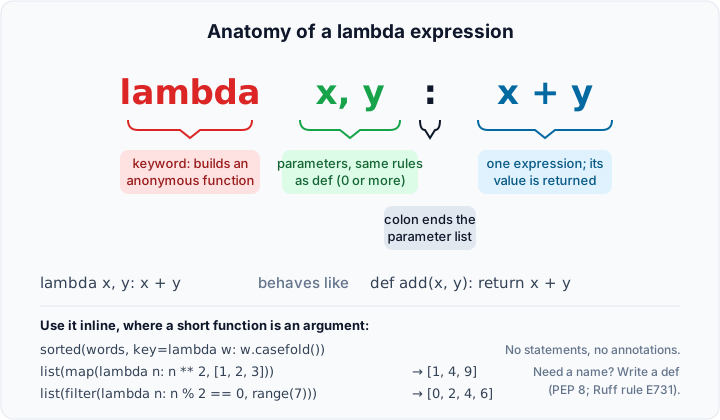
Lambdas shine as short arguments to other functions, especially key= functions for sorting. If you need a name, write a def: PEP 8 advises against assigning a lambda to a variable (linters report it as E731), because the function is then called <lambda> in every traceback and has no docstring.
Recursion
A recursive function calls itself. It needs a base case that returns without recursing and a recursive case that moves towards it. Recursion suits data that is itself nested:
Every call adds a frame to the call stack. CPython limits the depth (the default limit is 1,000; see sys.getrecursionlimit()) and doesn't optimise tail calls, so a missing or unreachable base case ends in RecursionError:
Starting from -1, n never reaches 0, and the traceback ends with RecursionError: maximum recursion depth exceeded. For deep or unbounded data, write a loop instead; raising the limit with sys.setrecursionlimit() only postpones the problem.
Check yourself
- What does a function return if it has no
returnstatement? - Why is
def add(item, items=[])a bug, and what is the usual fix? - After
def reset(xs): xs = []anddata = [1, 2]; reset(data), what isdata? Why? - What does
*mean indef f(*args), and what does it mean inf(*values)? - What does LEGB stand for, and in which scope is
lenfound? - A module has
total = 0, and a function runstotal += 1. What happens, and what are two ways to fix it? - What is a closure?
- When should you write a
definstead of a lambda?
Suggested answers
None.- The default list is created once, when
defruns, so every call that omitsitemsshares and grows the same list. Useitems=Noneand create a new list inside the function whenitems is None. - Still
[1, 2].xs = []rebinds the local name only; the caller's list is untouched. Only a mutation, such asxs.clear(), would be visible. - In a definition it packs extra positional arguments into a tuple. In a call it unpacks an iterable into separate positional arguments.
- Local, Enclosing, Global, Built in.
lenis found in the built in scope. UnboundLocalError: the assignment makestotallocal, so reading it first fails. Declareglobal totalin the function or, better, pass the value in and return the new one.- A nested function that keeps access to variables of its enclosing function after that function has returned.
- Whenever the function needs a name, a docstring, statements or more than one short expression. Keep lambdas for short inline arguments such as
key=.
Exercises
These exercises are optional practice. Pick the ones that help you.
- Largest value. Write
largest(a, b, c)that returns the largest of three numbers without callingmax(). Then writelargest_of(*numbers)for any number of arguments; called with none, it raisesValueError("largest_of() needs at least one number"). Example:largest(3, 9, 4)gives9andlargest_of(-5, -2, -9)gives-2. - Summary with options. Write
summarise(*values, digits=2)wheredigitsis keyword only. It returns(minimum, maximum, mean)with the mean rounded todigitsplaces, and raisesValueErrorwhen no values are given. Example:summarise(3, 1, 4, 1, 5)gives(1, 5, 2.8);summarise(1, 2, 2, digits=3)gives(1, 2, 1.667). - Flatten. Write a recursive
flatten(items)that turns arbitrarily nested lists and tuples into one flat list, keeping the order. Strings count as single items. Example:flatten([1, (2, [3, "ab"]), [], [[4]]])gives[1, 2, 3, 'ab', 4]. - Fix the basket. This version shares its default list between calls and changes the caller's list:
def with_item(item, basket=[]): basket.append(item); return basket. Callingwith_item("tea")and thenwith_item("milk")gives['tea']and then['tea', 'milk']. Rewrite it so it returns a new list and never mutates its argument; the two calls must give['tea']and['milk'].
Solutions
1. Largest value.
2. Summary with options.
Because digits comes after *values, a positional 3 is always a value, never the precision.
3. Flatten.
4. Fix the basket.
[*basket, item] builds a new list, so neither a default nor the caller's list is ever changed.